

Dental Laboratories
Dental laboratories receive digital scans, impressions and prescriptions from dental offices, then design, mill, 3D print or hand-finish crowns, bridges, dentures, orthodontic appliances and implants. For a lab handling same-day crowns, multi-unit bridges and nightly aligner print runs, the specialists turn case submissions into production schedules, track materials and inventory, manage design-to-finish workflows, coordinate rush cases and keep case-specific paperwork, shade matching and regulatory tracking current. Design approval, material certification and final quality checks stay with the lab owner and certified technicians.
What makes this business different
- Each case arrives with a unique prescription, digital scan or physical impression that must be matched exactly to the patient and tooth number
- Tight production windows with same-day, 48-hour and five-day turnarounds plus nightly aligner print batches
- Material and shade tracking across multiple cases with lot numbers for traceability
- Equipment scheduling for mills, 3D printers, sintering ovens and curing units that run on fixed cycles
- Design files that require dentist approval before milling or printing
- Compliance paperwork including material certifications, sterilization logs, work orders and FDA tracking requirements confirmed by lab owner
- Repeat dental-office clients who reorder based on case history and preferences
Specialist bots

Case Intake Coordinator
Turn incoming scans, impressions and prescriptions into verified digital work orders.
Works in: Ambitious Tasks, Ambitious Docs, Email Buckets · Workflows: Case intake and verification
Automates
- Reads submissions from portal or email
- Extracts patient, tooth, shade and material data
- Checks file quality and completeness
- Creates the master case task
- Drafts receipt confirmation
Stops for a person
- A technician reviews questionable scans or prescriptions
- The lab owner approves any rush commitments
- People handle physical impression disinfection and logging

Production Scheduler
Build daily production schedules that respect equipment cycles and turnaround promises.
Works in: Ambitious Tasks, Ambitious Sheets · Workflows: Design and production scheduling
Automates
- Assigns cases to design and machine queues
- Balances load across mills and 3D printers
- Calculates material needs from the case list
- Flags conflicts with nightly print runs
- Updates schedule as cases move through stages
Stops for a person
- The lab owner sets priority for urgent cases
- Technicians confirm final machine assignments
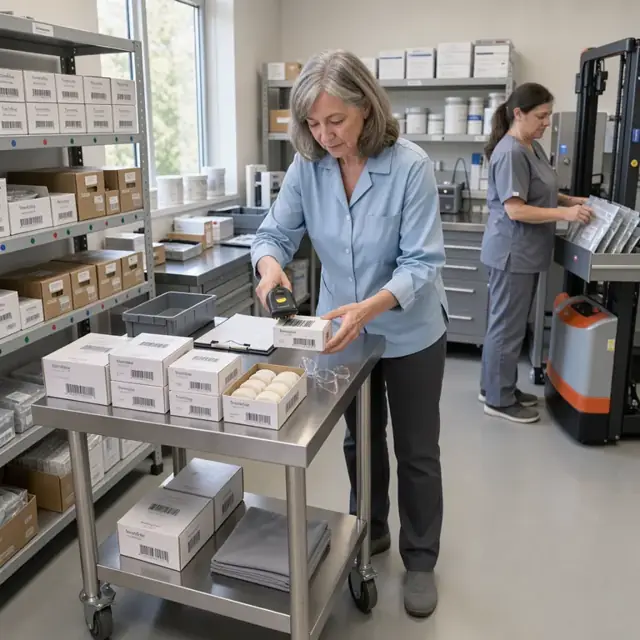
Materials and Inventory Manager
Maintain accurate stock of zirconia, resins, metals and consumables with full lot traceability.
Works in: Ambitious Sheets, Ambitious Tasks · Workflows: Material and inventory management
Automates
- Generates material requirements from open cases
- Subtracts from current inventory by lot
- Drafts reorder lists by supplier
- Records usage against each case
- Alerts before shelf-life dates
Stops for a person
- The owner places and approves all purchases
- A technician verifies incoming material lots

Quality and Finishing Coordinator
Run inspection checklists after milling or printing and schedule all finishing steps.
Works in: Ambitious Tasks, Ambitious Docs, Process Optimizer · Workflows: Quality inspection and finishing
Automates
- Creates case-specific quality checklists
- Logs fit, occlusion and shade data
- Routes cases needing hand finishing or staining
- Prepares final packaging lists
- Attaches inspection photos to the record
Stops for a person
- Certified technicians perform and approve all visual quality checks
- The owner reviews any case flagged for remake

Dentist Communication Liaison
Manage design approvals, change requests and delivery communications with dental offices.
Works in: Ambitious Docs, Email Buckets, Ambitious Tasks · Workflows: Dentist approval and communication
Automates
- Drafts design previews with notes
- Sends approval requests with deadlines
- Logs responses and change orders
- Prepares delivery packets with instructions
- Records office preferences for future cases
Stops for a person
- A technician or owner reviews every design before sending
- All outgoing communications are approved before transmission

Equipment Maintenance Coordinator
Track usage hours on all machines and generate timely maintenance schedules.
Works in: Ambitious Tasks, Ambitious Sheets, Process Optimizer · Workflows: Equipment maintenance scheduling
Automates
- Monitors cycle counts from each machine
- Builds weekly maintenance calendars
- Creates checklists for daily, weekly and quarterly tasks
- Logs completed service and parts used
- Flags machines affecting current production
Stops for a person
- The owner schedules and approves outside service calls
- Technicians perform and sign off on all maintenance

Regulatory Paperwork Clerk
Organize case paperwork, sterilization logs and material traceability records.
Works in: Ambitious Docs, Ambitious Sheets, Ambitious Tasks · Workflows: Regulatory paperwork and tracking
Automates
- Generates work orders and traceability sheets per case
- Compiles sterilization batch records
- Tracks license and certification renewal dates
- Assembles monthly production summaries
- Organizes digital files by case number
Stops for a person
- The lab owner confirms which regulatory requirements apply
- People review and approve all records before filing
- The bot never certifies compliance
Workflows
Case intake and verification
Starts when: A dental office submits a case by portal, email or physical shipment
- Capture patient ID, tooth number, prescription details, shade and material preferences
- Verify the digital scan or impression quality and completeness against lab standards
- Confirm turnaround time against current schedule and flag any rush requests
- Create a digital work order task with all case files attached
- Draft receipt acknowledgment for the dental office
Watch for: Incomplete scans or mismatched prescriptions must be flagged immediately; Physical impressions require careful handling and disinfection logging
Design and production scheduling
Starts when: After case intake is verified
- Assign the case to the correct design queue based on type and urgency
- Draft a production schedule using available mill, printer and technician capacity
- Generate material requirements and pull from inventory or reorder
- Route design files for initial technician review
- Track progress from design through milling or printing
Watch for: Equipment capacity is limited by cycle times and tool wear; Nightly aligner print runs must start at a fixed cutoff
Material and inventory management
Starts when: Daily and after each production run
- Explode the day's cases into a material and zirconia block list
- Check current stock levels and lot numbers
- Draft purchase orders for low-stock items
- Log material usage per case for traceability
- Track consumables such as burs, resins and polishing compounds
Watch for: Many materials have specific shelf lives and storage conditions; Lot numbers must be recorded for every restoration produced
Quality inspection and finishing
Starts when: After milling, printing or pressing is complete
- Generate a checklist for fit, occlusion, shade and surface quality
- Record inspection results and flag cases needing rework
- Schedule hand-finishing or staining steps
- Prepare cases for final sterilization or packaging
- Update the digital record with photos of the finished work
Watch for: Shade matching requires visual confirmation under standard lighting; Any rework must be tracked against original turnaround promise
Dentist approval and communication
Starts when: At design review and before final delivery
- Draft design previews with annotated notes for dentist approval
- Send approval requests with turnaround impact if delayed
- Log approval status and any requested changes
- Draft delivery notifications with instructions and paperwork
- Record feedback for future case preferences
Watch for: Design changes from the dentist can affect material use and schedule; All communications must be attached to the specific case record
Equipment maintenance scheduling
Starts when: Weekly and on machine cycle counts
- Track hours and cycles on each mill, printer, oven and scanner
- Generate preventive maintenance checklists based on manufacturer intervals
- Schedule technician time or service calls around production load
- Log maintenance performed and parts replaced
- Flag any equipment issues that affect current cases
Watch for: Downtime must be minimized during peak production days; Calibration records are required for certain machines
Regulatory paperwork and tracking
Starts when: With every case and on renewal dates
- Generate case-specific work orders and material traceability sheets
- Log sterilization cycles and batch numbers
- Track expiration of lab licenses, technician certifications and insurance
- Compile monthly material usage and production reports
- Keep design files and approvals organized by case
Watch for: Rules for dental devices vary by product class and require owner confirmation; All paperwork must be retained for the required period
Bot templates for this industry
- Dental Laboratories (7 bots)
Source: U.S. Small Business Administration, Office of Size Standards, Table of Small Business Size Standards Matched to North American Industry Classification System Codes, version March 2023 (effective 2023-03-17, NAICS 2022). Size standards are shown for reference only.